
Buzz / Guide / AI search
How to diagnose a sudden AI Overview drop in Search Console
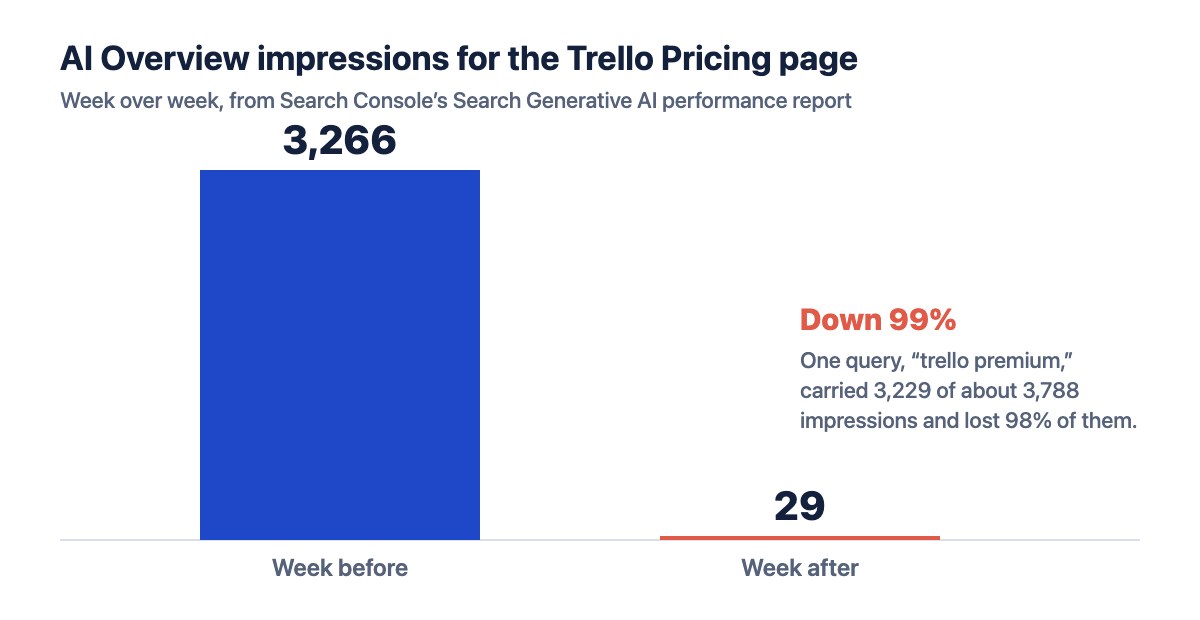
AI Overview impressions can collapse in a week while your rankings look fine. This is the 5-step check I use to find the cause, taken from a real case where a page fell from 3,266 AI Overview impressions to 29 in seven days.
99%AI Overview drop in the example
85%of AI Overview impressions came from 1 query
5steps to find the cause
Key takeaways
- Check the AI report first. Search Console’s Search Generative AI performance report shows whether the loss is in AI Overviews and AI Mode or in regular results.
- Look for one query. In my case, one search carried 85% of the page’s AI Overview impressions.
- Compare, don’t guess. The pages AI cites instead of yours show exactly what is missing.
- Fix with additions. 4 new sections and 5 rewritten blocks, not a full rewrite.
The real case behind this guide
In 2026, the Trello Pricing page I work on at Empyra lost almost all of its AI Overview visibility in a single week, while its regular rankings looked normal. These are the numbers from Search Console:
| Metric | Week before | Week after | Change |
|---|---|---|---|
| AI Overview impressions, whole page | 3,266 | 29 | Down 99% |
| Impressions from “trello premium” | 3,229 of about 3,788 | About 2% of that | Down 98% |
| “trello pricing plans” position | About 2 | Out of the results | Lost |
Step 1: Check whether the drop is in AI features or in regular search
Open Search Console and compare two reports for the same dates: the regular Search results performance report, and the Search Generative AI performance report Google added in June 2026, which covers AI Overviews and AI Mode. Filter both to the page on its own, not the whole site.
- Both fell: the problem is rankings or demand, not AI Overviews. Run a traffic drop check instead (see how I separated lost rankings from lost demand).
- Only AI impressions fell: Google stopped showing or citing your page in AI answers. Keep going.
Step 2: Find the queries that carried the AI Overview impressions
Sort the page’s queries by impressions in the earlier period. AI Overview impressions are often concentrated in one or two searches, so a single query can explain almost the whole drop.
In my example, one query, “trello premium,” carried 3,229 of about 3,788 AI Overview impressions and lost 98% of them. A second query, “trello pricing plans,” dropped out of the results from about position 2. That narrowed the problem from “the page” to two searches.
Step 3: Match the dates against Google updates
Check the Google Search Status Dashboard for core or spam updates in the same window. An update that lines up is a possible factor, not proof. Write it down and keep looking for a cause you can actually fix.
Step 4: Compare your page with the pages AI now cites
Search the lost queries yourself and note which pages the AI Overview now uses. Then list what those pages have that yours does not. Look for:
- Comparison tables against competitors
- Prices or costs broken down by team size or plan
- A visible “last updated” or “last verified” date
- Short, direct answers to the exact question in the query
In my example, competing pricing guides refreshed between April and August 2026 had all of these. The page I was fixing had none, so Google’s AI features moved to sources with clearer, fresher answers.
Step 5: Write a fix plan, not a full rewrite
Turn the gaps into a short, ordered plan your team can ship this week:
- New sections that fill each gap, with full copy ready to paste
- Old and new text side by side for existing blocks you change
- Target keywords for each lost query, used naturally
- A priority order, so the highest-impact fix goes live first
For the Trello pricing page, that meant 4 new sections and rewritten text for 5 existing blocks.
What happened next
The fix plan went to the team as a Word audit with ready-to-paste copy. After the edits, the page covered its target searches at 1.18% for “trello pricing,” 1.09% for “trello plans,” and 1.99% for “trello premium,” all above the 1% target in the brief.
Honest noteRecovery of AI Overview impressions takes time after changes go live. I treat the first one to two weeks of data as early signals, not results.
Mistakes to avoid after an AI Overview drop
- Rewriting the whole page. Targeted additions are faster to ship and easier to measure.
- Looking only at site totals. AI Overview drops usually hide inside one page and one or two queries.
- Assuming a penalty. In my example, the cause was stronger competing content, not a manual action.
- Reporting only the wins. Show the drop and the plan together; that is what earns trust.
AI Overview drop: common questions
Why did my AI Overview impressions drop while my rankings held?
Rankings in regular results and citations in AI Overviews are chosen differently. Your page can keep its blue-link position while Google’s AI answer switches to sources that answer the question more directly.
Can I see AI Overview data in Search Console?
Yes, if your site has it. Google launched Search Generative AI performance reports in June 2026, covering AI Overviews and AI Mode. They show impressions, pages, countries, devices, and dates, but not clicks, and Google is rolling them out to a subset of sites first. (Google’s announcement)
How long does an AI Overview recovery take?
There is no fixed timeline. Ship the fixes, request indexing for the updated page, and compare AI impressions week over week. Treat the first one to two weeks as early signals only.
About the author
I’m Nisha Bharti, SEO Analyst II at Empyra, an Atlassian Platinum Solution Partner, where I handle SEO and AI search for the US market. I have 4+ years in SEO and digital marketing. I ran this diagnosis on a live page and wrote the fix plan myself, so every number in this guide comes from that project, not from a hypothetical example.
See my case studies · Connect on LinkedIn
Sources
- Diagnosing a 99% AI Overview drop, the full case study with the original data
- Introducing Search Generative AI performance reports in Search Console, Google Search Central, June 2026
- Google Search Status Dashboard, for update dates
Read the full case studyDiagnosing a 99% AI Overview drop: 3,266 impressions to 29 in a week
At a glance
- 5 steps, in order
- Needs only Search Console
- Works for any page with AI Overview impressions
- Example from a real project
Skills
Tools
Case studies behind this guide
Want a second pair of eyes on an AI Overview drop?
I’m open to new projects and senior SEO roles in Bengaluru. Tell me about your site and I’ll reply with where I’d start.